

Airbag for AI Coding: Make Claude Code Write Safer Code
AI writes code fast. It also ships holes fast.
Claude Code security is not something you get by default. You get it by setting up guardrails. So I built airbag: a free, open-source kit that makes Claude Code follow security, database, performance and mobile-friendly rules in every project. It installs in 30 seconds. Get it on GitHub.
I’m a full-stack developer with 10+ years of PHP, Laravel, WordPress and Next.js work. I use Claude Code every day. It is the fastest teammate I have ever had. It is also happy to skip an authorization check if I don’t ask for one.
The numbers say I’m not alone:
- In Veracode’s 2025 test of 100+ AI models, AI-generated code introduced security flaws in 45% of tasks, and failed to defend against cross-site scripting 86% of the time.
- GitGuardian’s State of Secrets Sprawl 2026 found that 3.2% of Claude Code co-authored commits leaked a secret, about twice the 1.5% baseline for public commits (SC Media).
- A study of 481 public CLAUDE.md files found only 4.4% of their security rules were backed by a real Claude Code control under the strictest test, and only about 14 to 17% under looser ones (agentpatterns.ai). Most people write rules and hope.
That last number is the reason airbag exists. Rules alone are a polite request. Airbag adds the parts that actually enforce and check.
Claude Code security: what AI coding tools get wrong
AI-generated code usually works. The problem is what it quietly leaves out. These are the mistakes I kept fixing in my own Claude Code projects, and what airbag’s rules make it do instead.
| Area | What the AI tends to do | What airbag makes it do |
|---|---|---|
| Access control | Fetches /invoice/106 without checking it belongs to you (IDOR) | Check auth and ownership on every route |
| Injection | Builds SQL with string concatenation, echoes unescaped input (XSS) | Bindings/ORM only, escape all output |
| Secrets | Hardcodes keys, reads and prints your .env | Env variables only; Claude’s file tools are denied reading .env and keys |
| Database | Floats for money, no transactions, no indexes, N+1 queries | Integers/DECIMAL, transactions, indexes, eager loading |
| Bugs | Trusts the frontend, ignores empty, huge or Bangla input, double submits | Server-side validation and edge-case handling |
| Packages | Suggests packages that don’t exist or are abandoned | Verify the package and its license before installing |
| Mobile | Fixed widths, hover-only menus, tiny tap targets | Mobile-first at 360px, 44px touch targets |
| Honesty | Says “done” without running anything | Run tests, show the result, then report |
None of these are exotic. They are the OWASP basics. The AI knows them. It just doesn’t apply them unless something keeps reminding it, and stops it when reminding isn’t enough.
Four layers, from guidance to guardrails
Airbag works because each layer catches what the one before it can miss. Anthropic’s own docs call CLAUDE.md context, not enforced configuration, so airbag never relies on rules alone.
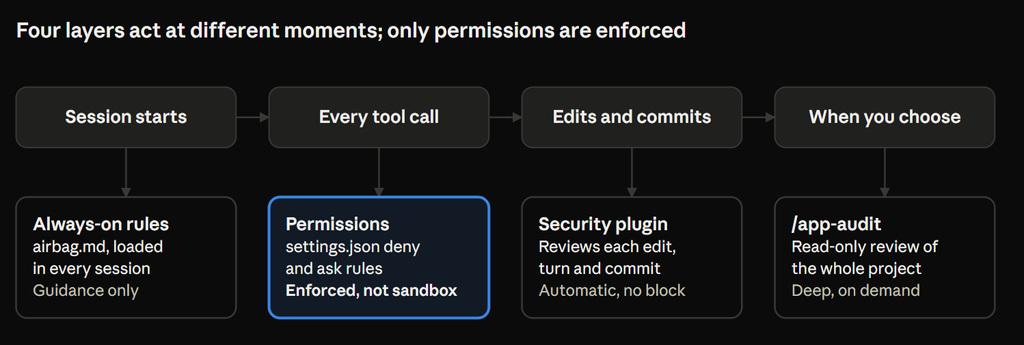
- Always-on rules (
~/.claude/rules/airbag.md). Claude reads them at the start of every session: security, database, bugs, performance, mobile, git, and how to report finished work. Strong guidance, but guidance. - Permissions (
~/.claude/settings.json). Enforced by Claude Code for every tool call they match. Claude’s file tools can’t read.envfiles, keys,~/.sshor~/.aws; force-push is denied; and it must ask beforegit pushor wiping the database. These rules are not a sandbox: a script or an unusual command can still slip past them, so for a hard boundary add Claude Code’s sandbox or aPreToolUsehook (permissions docs). - Anthropic’s security-guidance plugin. It pattern-checks every edit, has a separate Claude review each turn’s diff, and reviews deeper on each commit, then sends findings back to be fixed. Airbag adds your own rules to it. It does not block writes, so it is a reviewer, not a gate. It needs Python 3.10+ and a git repo, and its reviews use extra model usage.
/app-audit. A read-only review of the whole project that you run when you want it, before a release or after a big feature.
Install airbag in 30 seconds
You need Claude Code (terminal, VS Code or desktop) and git.
macOS, Linux or WSL
git clone https://github.com/iqbalmbadhan/airbag.git
cd airbag && ./install.sh
Windows (PowerShell)
git clone https://github.com/iqbalmbadhan/airbag.git
cd airbag; powershell -ExecutionPolicy Bypass -File .\install.ps1
The installer never overwrites your setup:
- Rules go to
~/.claude/rules/airbag.md, so your own~/.claude/CLAUDE.mdstays untouched. - Permission rules are merged into your existing
settings.json, with a backup saved first. - An existing
app-auditskill or security-guidance file is backed up or kept.
Then add Anthropic’s official security plugin inside Claude Code:
/plugin install security-guidance@claude-plugins-officialCheck it worked: open a new session and run /context (look for airbag.md under Memory files), type / (look for app-audit), and run /permissions (look for the .env deny rules). To remove it, run ./install.sh --uninstall (Windows: .\install.ps1 -Uninstall).
Audit any project with one command
/app-audit reviews a whole codebase and returns a ranked list of problems with the exact file and line. It is read-only: it never edits code.
/app-audit                       # whole project, all areas
/app-audit security              # just security
/app-audit db                    # database security and performance
/app-audit responsive            # mobile and all-device friendliness
/app-audit app/Http/Controllers  # one folder
What it does, in order:
- Maps your stack, routes and auth system.
- Runs whatever scanners you already have:
composer audit,npm audit,pip-audit, gitleaks, your linters and your test suite. - Works through a 9-section checklist: attacks, auth, secrets, database, bugs, dependencies and licensing, performance, devices, deployment.
- Reports every finding with severity, location, why it matters, and the fix.
- Ends with a fix plan and asks which items to fix.
A report looks like this (illustrative example, not a real project):
| # | Severity | Issue | Location | Fix |
|---|---|---|---|---|
| 1 | Critical | Invoice endpoint skips the ownership check (IDOR) | InvoiceController.php:42 | $this->authorize('view', $invoice) |
| 2 | High | No rate limit on /login | routes/web.php:18 | throttle:5,1 middleware |
| 3 | Medium | N+1 query in the order list | OrderController.php:27 | Eager load ->with('customer') |
| 4 | Low | Order table scrolls sideways at 360px | orders/index.blade.php:12 | Wrap in an overflow container or switch to cards on mobile |
Then fix one item at a time and re-run the audit. Small, verified steps beat one giant AI refactor.
Make it yours
Airbag is a starting point, not a cage. Three habits keep it working:
- Keep the rules short. Anthropic’s docs recommend keeping instruction files under about 200 lines, because longer files are followed less reliably (Claude Code memory docs). Airbag’s rules file is under 60.
- Add a line when Claude repeats a mistake. One specific line (“money is stored in paisa as integers”) beats a paragraph of advice.
- Put project rules in the project. Run
/initin each repo to create its ownCLAUDE.md. It loads alongside airbag, so global rules stay global and project rules stay local.
Using Cursor, Copilot or another AI tool? The rules are plain markdown. Copy claude/CLAUDE.md into AGENTS.md, .cursor/rules/ or .github/copilot-instructions.md. The audit skill is compatible with the open Agent Skills format. The permission rules and the security plugin are specific to Claude Code.
FAQ
Is AI-generated code secure enough for production? Not by default. Veracode found security flaws in 45% of AI coding tasks. Treat AI code like a pull request from a fast junior developer: review it, test it, and scan it before it ships.
What is a CLAUDE.md file and where does it go? It is a markdown file of instructions Claude Code reads at the start of every session. A project’s file sits in the repo root; personal rules for all projects go in ~/.claude/CLAUDE.md or ~/.claude/rules/, which is where airbag installs.
Does Claude Code always follow CLAUDE.md rules? No. Anthropic’s docs describe CLAUDE.md as context, not enforced configuration. That is why airbag adds permission rules, which Claude Code enforces for the tool calls they match.
How do I stop Claude Code from reading my .env file? Add deny rules such as Read(./.env) and Read(./**/.env) under permissions.deny in ~/.claude/settings.json. Airbag’s installer merges these for you. They stop Claude’s file tools, not every possible command, so for a hard guarantee also use Claude Code’s sandbox.
What’s the difference between CLAUDE.md, skills, permissions and plugins? CLAUDE.md is always-on guidance. A skill is a set of instructions loaded only when needed, like /app-audit. Permissions are hard allow, ask and deny rules. Plugins bundle extras such as hooks; the security-guidance plugin uses hooks to review code automatically.
Does the security-guidance plugin replace code review? No. Anthropic’s docs say it does not block writes or commits and can miss issues. Keep code review, CI scanning and real security testing for anything that handles money or personal data.
Does airbag work with Laravel, Next.js and WordPress? Yes. The rules and checklist include specific checks for Laravel (policies, $fillable, {!! !!}), WordPress (nonces, $wpdb->prepare(), escaping functions) and React/Next.js (dangerouslySetInnerHTML, bundle size). The rest is stack-agnostic.
Is airbag free? Yes. It is MIT-licensed, has no telemetry and no dependencies beyond git (and optionally Python for merging settings). It is an independent project, not affiliated with Anthropic.
Give your AI an airbag
AI coding is not going away, and neither are SQL injection and leaked API keys. Airbag takes 30 seconds to install and costs nothing. Try it on your current project, run /app-audit, and see what it finds.
- Star or fork it on GitHub.
- Found a bug it missed? Open an issue or a pull request with a new checklist item.
- Share what
/app-auditfound in your project. I’d love to hear it.